Discover the best way to submit your vector designs & artwork
When it comes to large format printing where small images often need to be enlarged, sometimes you will be asked to provide vector artwork. Vector artwork is also required for computer cut vinyl lettering and logos that you might stick to a van or a window. If you’ve not encountered this term before it can be a confusing subject, but our short guide will make it easy for you to understand and enable you to tell the difference between vector and raster (bitmap) artwork
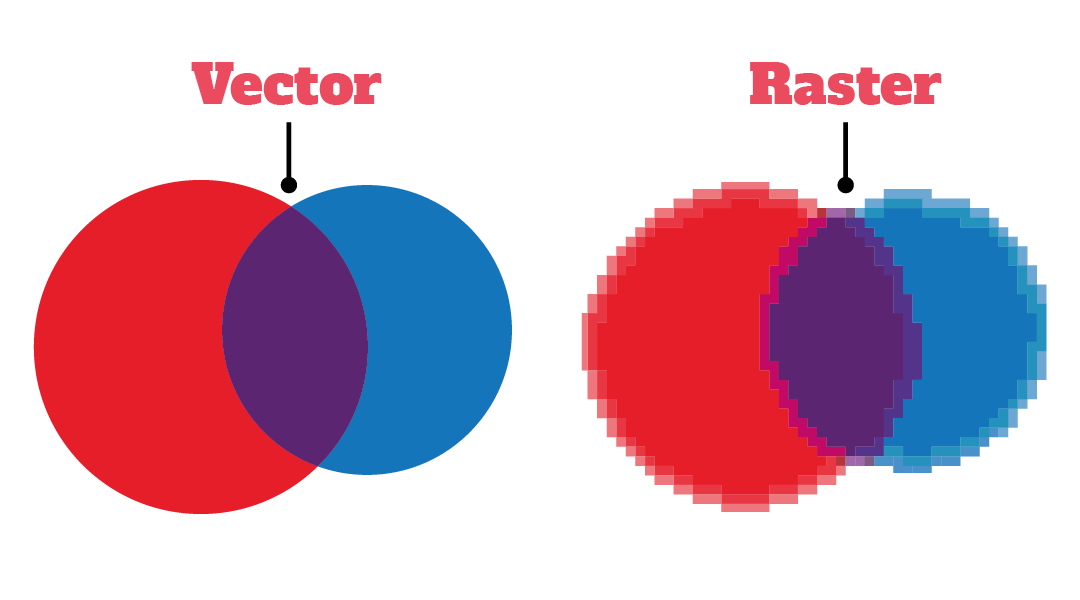
In very simple terms, vector art is made up from lines and has the advantage of allowing you to blow the image up as large as possible without any loss of quality. Raster artwork on the other hand is made up of dots known as pixels, that will lose quality as you enlarge them.
Because vectors use mathematical equations to create lines and images they can be reduced and enlarged without any loss of quality, making them ideal for printing applications.
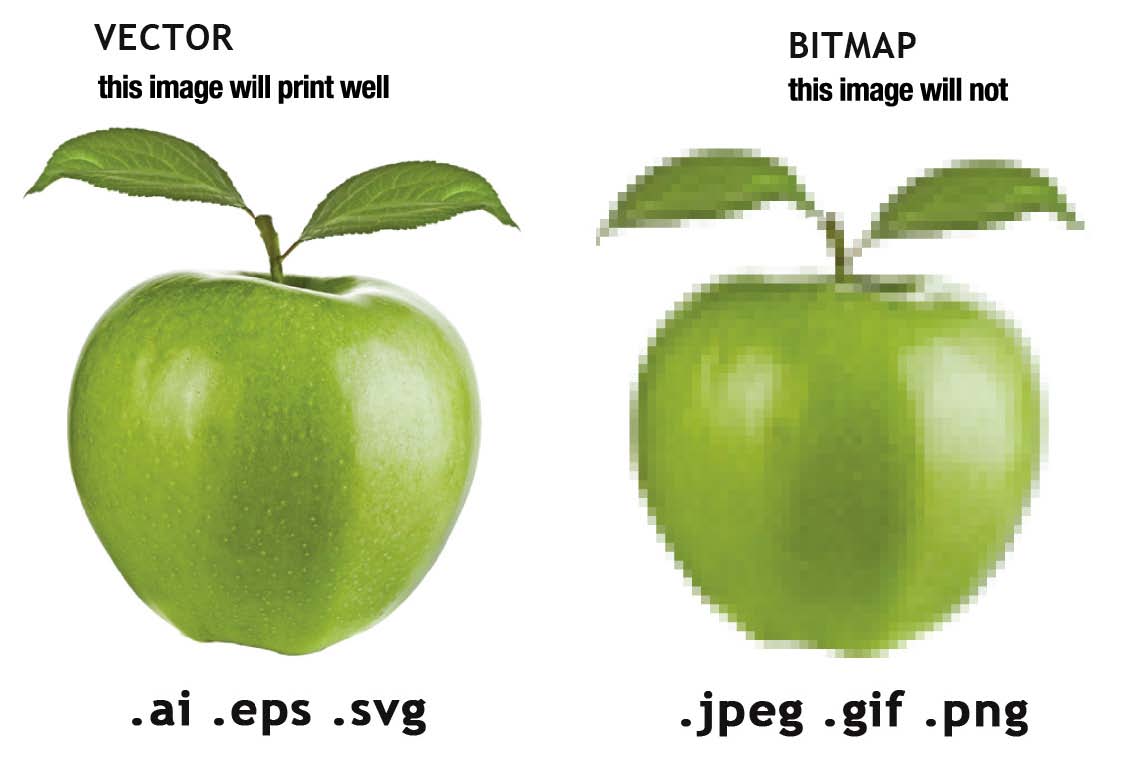
In the image above, we have enlarged each version by a factor of several hundred percent. You will notice how in the raster (bitmap) file, the edges of the art become distorted or pixelated when the picture is enlarged, while the vector image stays sharp. Vector files are created in programmes such as Adobe Illustrator, Corel Draw and have file extensions such as .ai .eps .svg or .pdf
Raster art can be used in print but the source file will need to be large enough for your requirements. However, they can not be used for vinyl that needs to be cut. Common raster file extensions include .jpg, .gif, .png and .tif.
It is a good idea to have master files of company logos and global branding saved as vector file as they are often used in various applications.
Is My Artwork Vector?
If your file name ends in .ai, .pdf, .eps or .svg, the chances are it is a vector. However, just because a file is saved in one of these formats, does not mean that iis truly vector format.
One of the easiest ways to tell is by enlarging the image by several hundred percent and see if the edges become distorted.
The only way to be sure your files is a vector is to open it in a vector editing program such as Adobe Illustrator or Corel Draw. If you open your file and use the selection tool on an area within the graphic, you might see something like this:
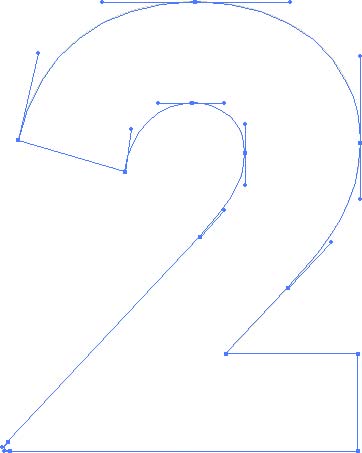
If you see see the nodes surrounding the graphic, you have the correct vector artwork. If you don’t have a vector programme, and are looking to purchase from Discount Displays, your artwork will be checked for free.
What If I Don’t Have A Vector File?
If you had a professional designer create your artwork, then the easiest way is to contact them, and ask for the file in a vector format. Alternatively, if your design has been printed previously, the printer you used may have a copy they could provide.
Depending on the quality of the original file, Discount Displays may be able to create a vector file for you. Check out our vectorising service for more information.
A third option would be to get a graphic designer to re-create the artwork for you, but depending on the artwork this method can be fairly expensive.
Vector graphics
- Vector images are important for print as they can be scaled up or down infinitely without affecting their quality or detail.
- They usually come in a smaller file size.
- Throughout their use they remain completely editable.
Vector graphics use maths to draw shapes using points, lines, and curves. Vector images are commonly used for logos, icons and geometric patterns, with Adobe Illustrator suiting this style of artwork much more favourably than Photoshop.
Raster images
- When scaled up in size, raster images become pixelated, losing quality and detail.
- They usually come in a much larger file size compared to vector graphics.
- Once they’re compressed into a jpg, png or gif, it then becomes harder to edit them.
Raster images are made of tiny squares of colour information, commonly referred to as pixels. Raster is mostly used for photographs, thus usually created or edited in Adobe Photoshop.
Frequently asked questions
Why print with vectors?
If your design doesn’t contain photographic elements and comprises of only shapes and typography like logos or icons, you should create it using vectors to ensure sharply defined edges when the design is printed.
Being scalable, this means that you can use the same artwork in different sizes for various products. For example, the logo on your Business Card will be smaller compared to your larger Roller Banners.
For which products is it essential we have vector artwork supplied?
Products including Pens, Bags and Water Bottles are crucial because we have a very particular specification requirement: all artwork must be vectorised, and all colours must be a Spot Pantone colour.
We’d love all artwork to be vectorised, but we understand this can’t always be the case.
How can you tell if your artwork is a vector file?
Enlarge your graphic on your screen by 300% or 400%. If your edges are blurry and appear to have various shades of colour, then it’s a raster image. If the edges are crisp and the colour appears solid, it’s most likely a vector graphic.
Your artwork isn’t vector, what can you do?
If you had a professional designer create your logo, first ask them for the vector files. If you’re from a larger company, ask your marketing or design department for vector files.
Why won’t my vector file work?
Raster images within a vector file format doesn’t count and won’t proceed to print. Your artwork needs to be a vector graphic within a vector file format for us to print it.
A common mistake is that raster images are placed and saved into vector programs such as Illustrator. However, this will still be a raster image, so your graphic will need to be created within a vector program itself.
Summary
Vector graphics are controllable, editable, and scalable at any size, meaning your artwork can be changed at any time to be used on different products. Raster images cannot be scaled up in size as they’ll decrease in quality and detail which makes it more challenging for print, especially with some of our products requiring vector graphics only. For more in-dpth reading please check out this article from Adobe.